
If your screening step’s completion rate has ended up on a slide as proof that candidates like the process, the slide is asking more of the number than it can give. A completion rate says how many candidates finished. It can’t say where the others left, or how the step felt to them.
Screening completion rate is still worth tracking. I’d treat it as a count of who finished, and read it only beside two other things: a record of where candidates stopped, and what candidates tell you about the step themselves.
This guide is about a screening step candidates take on their own, from an invitation link, before anyone on your team speaks to them. Below, you’ll write down what counts as “starting” and “finishing,” keep the raw counts, and record where candidates stop. Then you’ll split the rate by role and invitation route, ask candidates how the step felt, and question any vendor’s rate before you compare it with yours.
What a screening completion rate measures.
A screening completion rate is the share of candidates who started your screening step and reached its end. To work it out, divide the number who finished by the number who started.
Two choices decide the number: what counts as “starting,” and what counts as “finishing.” Change either one and the same week of screens produces a different rate.
Write down the start, the end, and who’s left out.
Before anyone reads a number, write down what counts as “starting” and what counts as “finishing,” along with a third choice: which candidates you leave out of the count. Then, when the rate moves, your team can talk about what changed in the screening step instead of how the rate was counted.
- Name what counts as “starting”: opening the link, or giving the first answer. Count completion from that point, and report the share of invited candidates who started as a separate rate.
- Name what counts as “finishing”: every question answered, or the last page submitted. Pick the one your system records reliably.
- Name who you leave out of the count and report separately: attempts a person has confirmed as fraud, and candidates who opted out before starting to take another route, such as a call with a recruiter. Keep a candidate who opts out partway through in the count.
If your screening tool flags possible fraud, keep a flagged attempt in the count until a person has reviewed it. That keeps the measurement honest: a real candidate whose answers were flagged by mistake stays counted. Report the number of flagged attempts beside the rate, so you can see a rise in flags on its own.
If you’re seeing more flagged attempts, this episode of our 10x Recruiting podcast covers fighting the rise of fake candidates.
Keep four counts for every screen.
A percentage hides how many people it describes, so record the raw numbers beside it. Four counts cover the step: “invited,” “started,” “completed,” and “opted out.”
From those counts, plus the point where each candidate stopped, you can build four measures. Each one answers a different question.
| Measure | What it tells you | What it can’t tell you |
|---|---|---|
| Invitation-to-start rate | How many invited candidates began the screen | Whether the others saw the invitation, or chose to ignore it |
| Completion rate | How many who began reached the end you defined | Why they finished, or how the screen felt |
| Opt-out rate | How many invited candidates chose not to use the screen | What led to that choice |
| Drop-off point | Where candidates left after they began | What made them leave at that point |
Read the “invitation-to-start” rate first. A screen can show a high completion rate while a large share of invited candidates never open it, because a completion rate counts only the candidates who started.
Keep candidates who opt out before starting as their own figure, including those who opt out to be screened by a person instead. Counting them as unfinished screens hides how many candidates chose another route.
Find where candidates drop off.
Once you’re keeping the four counts, look at where the candidates who started went missing. Record the question or the moment each one stopped, and look for the point where exits bunch up.
When exits are spread across the whole screen, look first at its length. When they bunch at one point, look for something at that point: a camera requirement the invitation didn’t mention, a device check that fails on some phones, or a question candidates misread.
Make one change at a time at the point where exits bunch up, then compare the next few weeks of counts with the weeks before, for the same role and the same way of inviting candidates.
When only a few candidates take the screen, each one moves the percentage a lot, so before you judge the change, wait until the counts are large enough that one candidate barely shifts the rate.
Split the rate by role and by how candidates were invited.
An overall completion rate mixes every group of candidates together, so a group that finishes less often can hide in the average. To find it, pick your groups first: what to leave out of the split, and what to split by. Choose them before you look at the results, because if you cut the numbers enough ways, some group will look low by chance alone.
- Who a person advanced after the screen
- Groups picked after you’ve seen the results
- Role
- How candidates were invited, such as a link in an email or a text message
- Device type, if your system records it
Don’t split by who was advanced. A person makes that decision after the screen, so candidates who left partway through end up rejected or undecided almost by definition. Split completion by that decision and all you’d learn is that candidates who didn’t finish weren’t advanced.
When one group’s completion falls well below the others, start there. The cause may be the screen itself, such as a device check that fails on some phones, or a difference in the candidates in that group. To tell which, look at where that group’s candidates stopped.
Ask candidates how the screen felt.
The counts show how many finished and where the others stopped. How the screen felt comes from the candidates, so send a short feedback request to each of the three groups below.
| Who gets the request | When to send it | What it asks about |
|---|---|---|
| Candidates who finished | At the end of the screen | How the screen felt |
| Candidates who left partway | By email, within a day of leaving | How the screen felt, up to the point they left |
| Candidates who opted out | Once they’ve taken the other route | How the route they took instead felt |
Send every request before anyone decides who moves forward. Asking before that decision keeps the answer about the screen. A candidate who has already been turned down may answer about the rejection instead, and the two are hard to separate afterward.
If your request asks candidates to rate the screen, report every rating with the number of replies behind it and the share of each group that replied. A rating built on a handful of replies, or on replies from only one group, says more about who answered than about the screen.
For the parts of candidate experience beyond the screening step, we have a full guide to “improving candidate experience across the hiring process.”
Read the feedback and the other route against the decisions.
Feedback is different from completion: you collected it before anyone decided, so once decisions are made, you can split it by them and see whether candidates who weren’t advanced describe the screen differently. Compare what candidates said across those a person advanced, those a person rejected, and those still undecided. Within each group, keep finishers apart from candidates who left partway.
Not every rejection comes from a person. Some screens turn candidates down by a rule, for example for missing a deadline. Keep those candidates’ feedback as a group of its own, because no person made that decision.
The decisions also show whether the other route is fair. Compare how often candidates who completed the other route were advanced with how often candidates who finished the screen were. A large gap is a reason to check that the other route assesses the same requirements as the screen, though the two groups may differ in other ways too.
Ask every vendor how it measured its rate.
If you’re choosing a screening tool, you’ll meet completion rates you didn’t measure yourself. A rate in a vendor’s deck uses the vendor’s own definition, so ask for five details behind the rate before you compare it with anything:
- What counts as “starting” and what counts as “finishing.”
- Who the count leaves out, such as candidates who opted out.
- Which candidates the figure covers, and over what period.
- The raw counts behind the percentage.
- The figure split by role and by invitation route.
Compare two rates only when those details match. If they don’t, part of the gap comes from how each rate was counted and part from the candidates, and you can’t tell how much is which. Even when the details match, the rates describe different candidates, so take any gap back to the vendor as a question.
Then try the screen from the candidate’s side. Open the invitation on a phone and take it as a candidate would. If the screen offers an opt-out, use it, so you see what a candidate who opts out sees next.
Where Metaview fits.
Metaview Screening is one way to run the screening step this guide measures, so every question in the vendor section applies to it too.
Screening holds a voice-led screening conversation with each candidate a team chooses to assess. It follows up on their answers, and candidates can ask it questions back.
Candidates start from a link they open on desktop or mobile, with no account to create, whenever it suits them.
Before anything goes out, your team can preview the full call as a candidate would take it, which is the check the vendor section suggests.
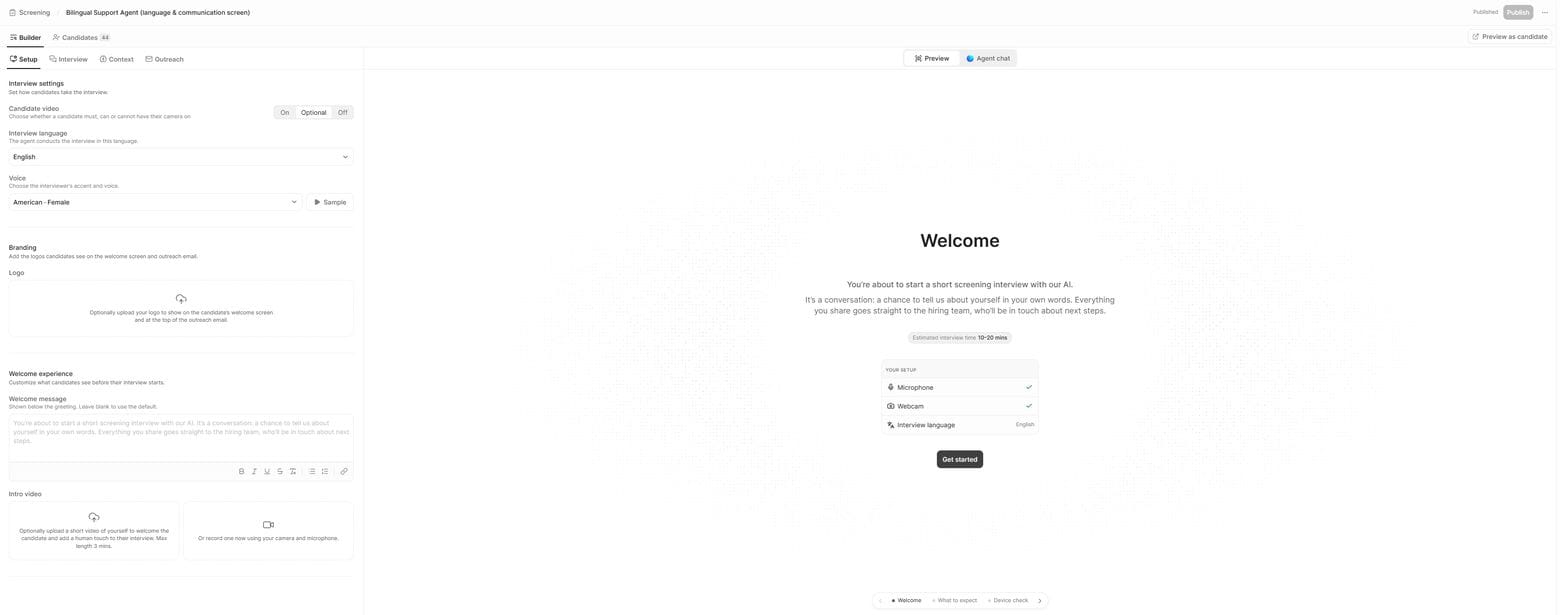
During a call, Screening flags responses that are likely assisted by artificial intelligence (AI), or fraudulent. A flag is evidence for a recruiter to weigh, never a decision, which is why flagged attempts stay in your count until a person has confirmed them.
For every completed call, a recruiter decides who moves forward, and Metaview does not make that decision. That decision is the one to split your feedback by.
Screening adheres to the European Union (EU) AI Act and New York City Local Law 144, and a team can offer candidates the option to opt out of a screen.
Candidates who opt out of a screen still need another route, such as a call with a recruiter, and on that call the Metaview Notetaker captures every spoken word. That record lets you read back what the recruiter asked, and check that candidates on the other route were assessed on the same requirements as the screen.
Whichever route a candidate takes, how that step feels to them is part of closing the ones you want. Writing about interviewers, Shahriar Tajbakhsh, our Co-Founder, put the cost of losing a strong candidate plainly.
Good interviewers know that failing to close an excellent candidate is a silent company killer.”

A candidate who drops out of your screen leaves without a word, so the counts and the feedback above are how you hear about it.
Test the figure you report today.
Check your current completion figure against four questions. Each one ends in the first thing to fix if the answer is “no.”
- Is the definition printed with it? If not, write down what counts as “starting” and “finishing” before the next report.
- Are the raw counts beside it, including the number invited? If not, add them, starting with the invited count, because without it you can’t work out the “invitation-to-start” rate.
- Do you know where exits bunch up? If not, start recording the point each candidate stopped.
- Have you heard from candidates before any decision was made? If not, send your feedback request to everyone who started the screen or opted out of it, before anyone decides who moves forward.
Measured this way, a screening completion rate tells you one honest thing about candidate experience: how many candidates got through your screening step. I’d never report it alone. In your next report, put it beside the point where the others stopped and what candidates said before anyone decided, and the next change you make to the screen will have a reason behind it.
Give candidates a screening step they can take when it suits them.
See how Metaview Screening holds a screening conversation, and how a recruiter decides who moves forward for every completed call.
Frequently asked.
What is a good screening completion rate?
There’s no single good number, because each tool can define “starting” and “finishing” differently. Compare your rate with its own history, measured the same way. Use a published benchmark only if it says what it counted as “starting” and “finishing,” and which candidates it covers.
What should a screening invitation tell candidates?
Say what the screen involves, roughly how long it takes, and whether a camera is needed. Add how to reach a person if something goes wrong. A detail left out of the invitation can surface as drop-off at the moment the candidate meets it.
What should candidates who opt out get instead?
A route that assesses the same requirements by the same standard, such as a call with a recruiter. A candidate may opt out because they need an accommodation, so ask your legal team what your process owes them.
Should a screening step have a deadline?
Yes, as long as you report the candidates who miss it. A deadline keeps the process moving, and it also creates a group of candidates who never finished because time ran out. Report that group on its own, and decide whether a person reviews those candidates before anyone is turned down for missing it.


