The job description has more leverage on hiring outcomes than any other piece of writing a recruiter produces.
It decides who applies, who self-rejects, and how much rework the recruiter does later. And in 2026, almost nobody writes one from scratch anymore.
The 8 tools below are the free AI job description generators worth using. Each one earns its place by producing a JD that doesn't sound like every other JD on LinkedIn.
All 8 tools at a glance.
| Tool | What it does well | Free tier reality |
|---|---|---|
| Metaview | JDs from intake calls, tied to your hiring rubric | Free with a work email |
| ChatGPT | Custom GPT per role family with your context | GPT-5.5, 10 messages per 5-hour window |
| Claude | Long-form structured prose, Projects per role | Daily message cap with Sonnet 4.6 |
| LinkedIn JD Generator | In-platform draft for LinkedIn job posts | Free for posting users |
| Workable JD Generator | ATS-integrated draft with role library | Free standalone tool, no account |
| Textio | Bias detection and inclusive-language scoring | Limited free trial |
| Grammarly | Free, no-signup JD writing | Free |
| Hireguide | Structured JD plus interview-kit generator | Free starter tier |
1. Metaview.
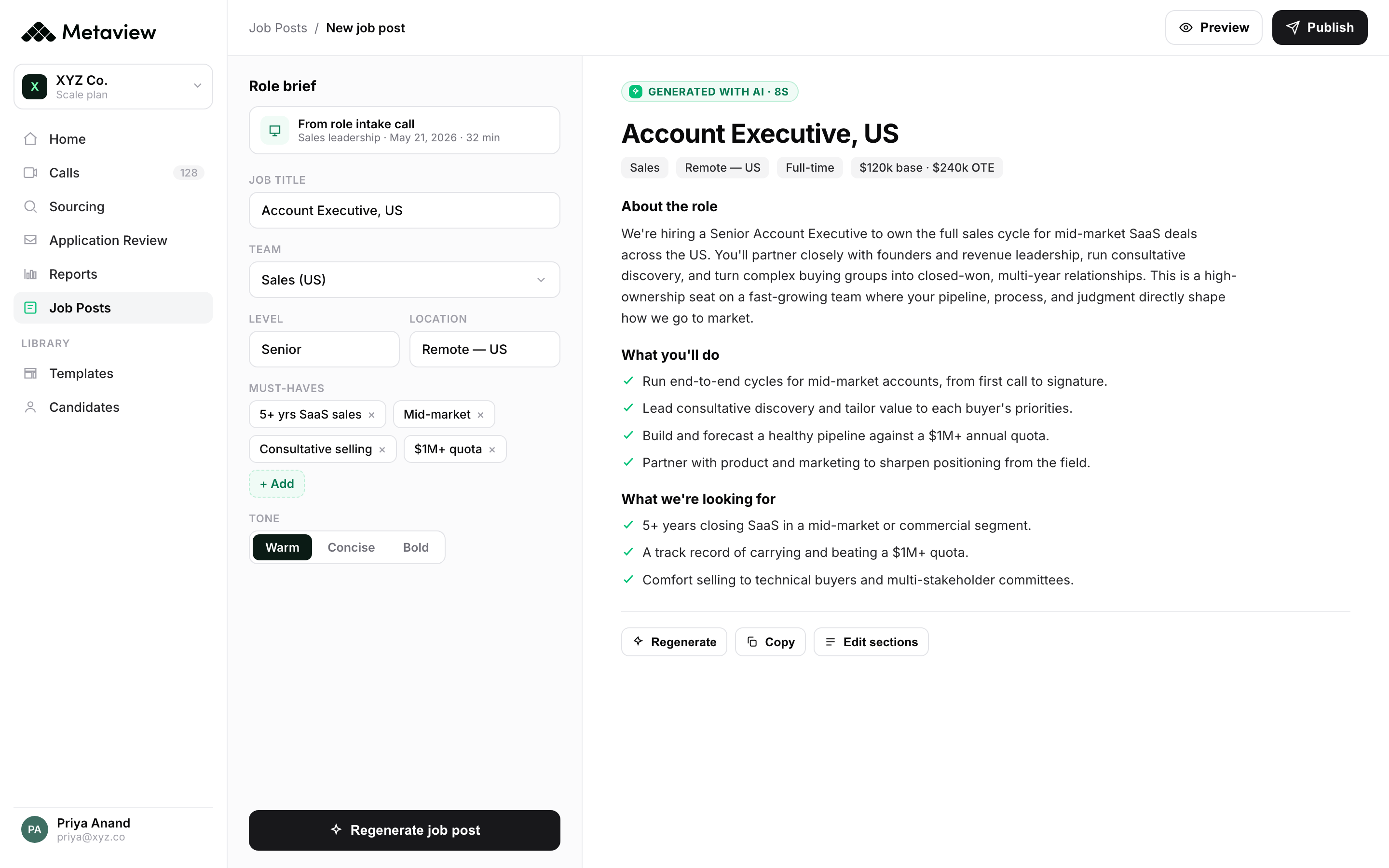
Metaview is the only tool on this list that generates a JD from the actual intake call, not from a generic prompt.
The Notetaker captures the intake conversation between recruiter and hiring manager. The AI then drafts the JD against your competency rubric, the role's actual outcomes, and the team-specific context surfaced in the call. The draft starts at 80% accurate instead of 40%.
Key features: JD generation from intake call; rubric-tied competency mapping; ATS write-back; multilingual support; structured scorecard generation alongside the JD.
Pricing: Free with a work email.
Best for: Recruiting teams that already run structured intake calls. The JD becomes a byproduct of work that's already happening.
2. ChatGPT.
The default for fast, lightweight JD generation. The free tier is enough for most use cases.
The setup that earns its keep: one Custom GPT per role family, seeded with your past successful JDs, your competency rubric, and three or four real candidates who succeeded. The output gets specific to your team, not industry-generic.
Pricing: Free tier: GPT-5.5, 10 messages per rolling 5-hour window.
Where it falls short: No ATS write-back; the JD lives in copy-paste land.
Best for: Recruiters who want a fast first draft they'll edit before publishing.
3. Claude.
Claude wins on prose quality. The JD reads less like a template and more like writing.
Projects keep your role-family context attached so each new req re-uses the same brief, rubric, and tone.
Pricing: Free tier with daily message cap on Sonnet 4.6.
Where it falls short: No Custom GPT-equivalent catalog. Free cap is hit faster than ChatGPT under heavy use.
Best for: Teams where the JD is candidate-facing copy, not boilerplate.
4. LinkedIn Job Description Generator.
LinkedIn's free in-platform tool drafts a JD against the role title and a few prompts. The output is generic but well-structured.
Pricing: Free for posting users.
Where it falls short: JDs read like every other LinkedIn JD. Editing for specificity is required.
Best for: Teams that post primarily on LinkedIn and need a first draft that publishes natively.
5. Workable JD Generator.
Workable's standalone free JD generator is gated but produces decent first drafts. The role library is broader than most competitors.
Pricing: Free standalone wizard, no account.
Where it falls short: Limited to predefined role categories; specialized or unusual roles need manual rewriting.
Best for: Mid-market HR teams wanting a quick, no-commitment first draft.
6. Textio.
Textio is the bias-detection and inclusive-language tool, not a pure generator. It scores your JD draft against patterns that predict candidate diversity and overall application rate.
Pricing: Limited free trial; paid plans on request.
Best for: Teams that already have a draft and want a bias + inclusivity pass before publishing.
7. Grammarly.
Grammarly's free job description generator turns a few role details into a clean, well-written posting with no signup required. It runs on Grammarly's writing engine, so the tone stays clear, professional, and jargon-free.
Pricing: Free, no account required.
Where it falls short: It writes and polishes copy but has no hiring context, no role intake, and no link to your interview process, so the draft stays generic until you add the specifics.
Quick, well-written first drafts when you want clean copy without creating an account.
8. Hireguide.
Hireguide generates both the JD and the structured interview kit in one workflow. The kit-and-JD coupling is the differentiator.
Pricing: Free starter tier.
Where it falls short: Smaller content library than ChatGPT or Claude; specialized or unusual roles get less coverage.
Best for: Teams that want JD and interview kit produced together to ensure rubric alignment.
How to use them well.
The biggest mistake with AI JD generators is publishing the first draft.
The right workflow: generate the first draft, edit for specificity in the first 60 words, run a bias-detection pass, then publish.
Two specificity edits matter most: the role's actual outcomes (not responsibilities) and team-specific context (not company boilerplate).
Metaview's intake-call-to-JD workflow eliminates the specificity edit because the JD draft includes the actual brief from the intake conversation. For teams without a structured intake process, the ChatGPT-or-Claude draft plus a Textio pass is usually enough.
4,000+ organizations now run hiring on Metaview, including Brex, emnify, Quora, Workleap, Lightspeed, Catawiki, and Automattic.
Bring Metaview into your hiring stack.
Live notes, structured scorecards, and ATS sync, set up in under 10 minutes.
Frequently asked.
What's the best free AI JD generator?
Metaview if you already run structured intake calls. ChatGPT or Claude if you don't. Both produce a usable first draft inside a few minutes; the edit is what makes it specific.
Should I publish the AI-generated draft directly?
No. The first 60 words always need a specificity edit: actual role outcomes, team-specific context, the project the hire will own first. Without that, the JD reads like every other generic posting.
How do I avoid bias in AI-generated JDs?
Run the draft through Textio or a similar bias-detection layer. AI tools default to industry-average phrasing, which often carries subtle exclusionary patterns by accident. The second pass catches them.
Can I use ChatGPT for JDs at scale?
Yes, with one Custom GPT per role family seeded with your past successful JDs and competency rubrics. The free tier covers most teams up to 20-30 JDs a month.
Are AI JDs better than templated ones?
When edited, yes. When published raw, they're equivalent. The advantage of AI is the speed of the first draft, not the quality of the unedited output.
How long should a JD be?
300-500 words for the typical knowledge-worker role. Longer than that and you lose readers in the second screen. Shorter and you don't surface enough context for the candidate to self-select.