
Sending more outreach emails feels like progress. More volume, more touches, more chances for a reply. In practice, volume without relevance trains candidates to ignore you, and the response rate drops the harder you push.
Recruiters get replies by sending messages grounded in something specific the candidate didn't expect them to know. That signal lives upstream of the email itself, in the intake call, the prior interview transcript, and the ATS history your team already has.
This post walks the six moves that turn captured signal into ready-to-send drafts, plus the Metaview Outreach, AI Sourcing, and Notetaker surfaces behind each one. The email is the unit you ship, not the unit you craft from scratch every time.
Why volume-first outreach trains candidates to ignore you.
The reflex when reply rates dip is to push more volume. Bigger list, tighter sequence, faster spacing. The arithmetic feels right. The reality is the opposite: generic outreach trains your audience to dismiss your sender name on sight, and once you're filtered, no follow-up earns you back.
The data is consistent. High-volume cold campaigns average around 2.1% replies versus close to 5.8% for smaller, more targeted sends. A 2-3x gap on the same effort budget, and relevance is what explains it.
Most teams try to close the gap with smarter templates. Bigger dynamic-field lists, persona swaps, subject-line A/B tests. These all help a little.
But they cap out at the depth of the data you can pull in, and the standard research stack is the same one every other recruiter uses. The teams that break out use a different data layer: the signal their own hiring conversations have already captured.
Alignment at kickoff is where personalization data starts. The data layer comes first, before you write a single email.
Six moves that turn captured signal into replies.
This is the structure recruiting teams use to keep reply rates above 5% while scaling outreach from twenty candidates a week to several hundred. Each move builds on the previous. Skip any one and the next one caps.
1. Capture the signal before you write the email.
The strongest personalization tokens never come from a LinkedIn profile. They come from your own hiring conversations: the intake call, the prior interview transcript, the ATS history.
The intake where the hiring manager named what the last two senior engineers couldn't do. The interview where a candidate explained why they walked away. The silver-medalist whose relocation blocker just lifted.
That signal is the moat. It lives inside your stack, not on the open web. Capture before you write means treating every intake and every interview as source data for tomorrow's outreach.
This is where Notetaker earns its place. Structured notes stay searchable across the team, so the recruiter writing the email pulls the hiring manager's exact phrasing without retyping it.
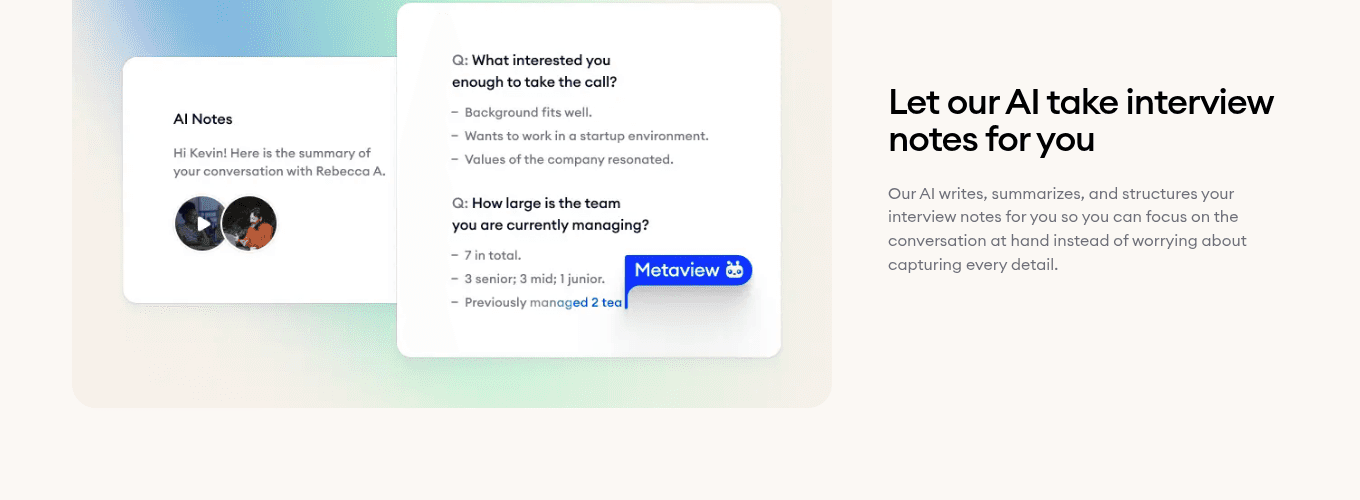
- 1Structured notes capture the hiring manager's exact phrasing from the intake call.
- 2Topic chips let the recruiter pull a specific theme into the outreach.
- 3The recording stays attached, so wording that landed with a candidate is recoverable later.
2. Build templates with intentional gaps.
Templates work when they're built with intentional gaps that get filled with signal belonging to the candidate. Rigid templates without gaps cap the personalization ceiling; structured-gap templates compound it.
Dynamic fields go beyond first name: current company, most recent role move, a specific skill, a mutual signal. The slot is the structural carrier. The signal you drop into it is the substance.
Persona variations layer on top. A senior engineering leader and a mid-level product manager don't respond to the same framing. Two or three persona-based variants cover most of the ground. Engineers care about tech stack. Salespeople care about territory and quota.
3. Write subject lines for the 40-character mobile ceiling.
The subject line decides whether the body gets read. With around 61% of opens happening on mobile, you have roughly 40 characters before truncation. Small real estate, heavy job.
Subject lines that earn the open share three properties. They reference something candidate-specific. They spark curiosity without clickbait. They avoid phrases that scream mass outreach: exciting opportunity, are you open to, I came across your profile, all-caps, exclamation strings.
Compare Exciting opportunity at Stripe with Your Stripe payments work + our team. The first could go to anyone.
4. Design multi-touch sequences that add value at each touch.
One email rarely works. Most positive replies arrive on the second, third, or fourth touch. The discipline is to add something new with each message, not to repeat the ask louder.
A four-touch shape: touch one leads with relevance and brevity, under 150 words. Touch two adds something useful, like a relevant article or team insight. Touch three leans on social proof: a recent team win, others who've made similar moves. Touch four closes respectfully and leaves the door open for later.
Space the sequence over two to three weeks. Four touches in four days reads aggressive. Value at each touch is the rule that keeps the cadence honest.
5. Tier high-touch vs low-touch by candidate criticality.
Not every candidate warrants the same investment. The most efficient teams tier the effort by role criticality and candidate seniority. Fifteen minutes of research per junior SDR caps your pipeline at twenty a day. Two minutes per executive search caps your hit rate at zero.
Senior and niche-skill candidates earn deep research: recent talks, company moves, specific intake-call context from the hiring manager. High-volume roles run on the dynamic templates from Step 2.
Lighter personalization still has to clear the relevance bar. We're hiring SDRs performs worse than Your inside-sales work at Workleap caught our eye.
6. Close the loop, so replies feed the next sourcing pass.
The last step is the one most teams skip. Every reply is feedback the next sourcing brief should learn from. "Not now, check back in six months" is a flag, not a closed thread.
A specific objection just told you what the role is missing. Silence after a captured-signal message means the signal you led with isn't the one that resonates with the persona.
Feed the pattern back into next week's AI Sourcing brief. The flywheel is real: the loop closes here.
How Metaview Outreach turns captured signal into ready-to-send emails.
The six moves above describe the work. Metaview Outreach is what makes the work compoundable. Multi-step sequences sit on the same surface where your sourcing already lives, so captured intake and interview signal flows straight into the message without copy-paste between tabs.
- 15 minutes of manual research per senior candidate.
- Personalization stops at generic enrichment fields.
- Sourcing list exports to CSV, then to a separate tool.
- Contact data is a guess. Bounces hurt sender reputation.
- Replies land in a separate inbox. Patterns get lost.
- AI drafts from captured intake and interview signal.
- Personalization pulls from hiring-manager phrasing.
- Sequences launch directly from the shortlist.
- Verified contact data lands in the right inbox.
- Reply patterns feed the next sourcing brief.
Four capabilities carry the workflow. AI-drafted personalization generates message starts from the captured hiring context, so the recruiter starts at refine, not blank page. Multi-step sequences set the cadence and follow-up logic from the same surface, with no separate reminder system.
Verified contact details reduce bounces and protect sender reputation. Reply tracking shows which sequences drive interviews, closing the Step 6 loop inside the same workspace.
It's powered by the same AI Sourcing agent that surfaced the candidates: continuous sourcing against the role, Deep Research Mode for new markets, and Workplace Knowledge rules that learn across every search.
How Metaview Outreach reshapes the recruiter's week.
The numbers from teams running this end-to-end follow a consistent shape. Reply rates climb from the 2-3% range that volume-first sends produce into the 6-8% range that captured-signal outreach hits. The time math compounds across roles.
The mechanism behind the reply-rate lift is sequencing more honestly than candidates encounter elsewhere.
Sending a 4-stage sequence using email instead of InMail can increase your response rate by about 2x. A 68% increase in positive response rate just from sending three follow-ups. A lot of talent has their InMail notifications off.”

Each customer arrives at the same shape from a different starting point. Brex moved Metaview from nice-to-have to foundational on the back of this time math.
Scale recruiting outreach without adding headcount.
Personalization at scale is no longer a contradiction. Capture upstream, architect templates with gaps, write subject lines for the mobile ceiling, sequence with value, tier the effort, close the loop. Replies are how the loop pays off. Ready to try it on your own pipeline? Start free with Metaview or book a demo below.
Frequently asked.
Are recruiting emails considered spam under GDPR or CAN-SPAM?
Generally permissible under legitimate-interest provisions in both jurisdictions, but you have to honor unsubscribe requests promptly and provide a clear opt-out. For EU candidates, be ready to articulate the legitimate-interest basis. Naming the recruiter and the source of the contact strengthens the claim.
How many touches should a recruiter outreach sequence include?
Three to five touches over two to three weeks is the working range. Reply curves typically peak between the second and fourth touch and flatten after that. The bigger lever inside that range is what each touch adds: a new piece of context, not a louder version of the same ask.
How can recruiters personalize when candidate data is sparse?
Lean on what's public: the company, the team, a recent product launch, a pattern in the role history. Company-specific and role-specific framing still feels relevant when individual detail is thin. If you have captured signal from a prior interview or a sibling-role conversation, that becomes the anchor.
What time of day gets the best response rates?
Mid-morning weekdays tend to perform well as a starting point, with industry and seniority shifting the optimum. The bigger lever is testing with your specific audience. A weekly cohort A/B across two send windows surfaces a candidate-specific pattern faster than any global benchmark.
Does AI-drafted outreach feel less personal to candidates?
Only when the draft is shipped raw. The discipline is human-judgment-on-top: AI handles the research and the first draft, the recruiter refines the tone. Captured-signal AI drafts read as personal because the signal itself is personal. The candidate sees hiring-manager phrasing or a project reference, and the assist becomes invisible.
Bring Metaview into your hiring stack.
Live notes, structured scorecards, and ATS sync - set up in under 10 minutes.


