
A Zoom interview can end with two transcripts and an empty scorecard. The live captions scrolled past while the candidate talked, and the cloud recording’s transcript comes in a second email, after the one saying the recording is ready. By the time anyone opens it, the feedback may already be written from memory, or not written at all.
Zoom interview transcription is worth switching on, and I’d set it up for one job: putting the candidate’s own words in front of the interviewer while they write the scorecard. So pick one transcript to keep, and have every interviewer write the scorecard from it on the day of the interview.
Skip that second habit and the transcript turns into a file someone opens only after two interviewers remember the same answer differently.
Pick the Zoom transcript your team keeps.
Zoom can transcribe an interview in two ways, and each does a different job. Decide which one is the hiring record before the first call, because otherwise each interviewer keeps whichever file they find first.
| What to compare | Live captions | Cloud recording transcript |
|---|---|---|
| When it runs | During the call, as people speak | After the call, once Zoom has processed the cloud recording |
| What it needs | Automated captions enabled in your Zoom settings | Cloud recording and audio transcription turned on, on a Pro, Business, Education, or Enterprise account |
| What you keep | A text file of the full caption transcript, if someone saves it during the call | A transcript file stored with the recording, split into sections that each carry a timestamp |
| What it’s for in hiring | Helping the candidate and the interviewer follow each other | The record the scorecard quotes from, which you can search and correct later |
I’d make the cloud recording transcript the record. Each section carries a timestamp, so a hiring manager who doubts a line in the scorecard can find that moment in the recording and hear the answer for themselves. Leave captions on for the call itself, and file the cloud transcript only. Two transcripts of one interview can differ, and the debrief then argues about which version is right.
Once the interview is over, a separate guide covers what to do with interview transcripts after the call, from rereading a scorecard’s quotes before the debrief to coaching the interviewer.
Set up Zoom interview transcription before the first call.
Set the recording up once, for everyone who interviews and before the first interview is booked, so the record exists whether or not an interviewer remembered a setting.
- Ask a Zoom admin to turn on cloud recording and the “Create audio transcript” setting for the account, or for the group your interviewers belong to, and to lock the transcript setting. A locked setting stays on for every interviewer in that group.
- Tell the candidate before the call that the interview will be recorded and transcribed, then say it again when the call starts. Your company’s policy and the law where you and the candidate are decide the wording, so agree it once with whoever owns privacy.
- Start a cloud recording at the top of every interview, once the candidate has heard the notice. Zoom’s audio transcription applies only to cloud recordings, so a recording saved to the interviewer’s computer gets no transcript.
- Plan another way to capture interviews held in a language other than English. Zoom’s help page for the transcript setting says audio transcription only supports English.
- Ask interviewers to take the call away from background noise and to use an external microphone, which is Zoom’s own advice for a cleaner transcript.
Consent before the call and storage afterward are covered in a separate guide to recording interviews.
Clean the transcript before anyone quotes it.
A raw Zoom transcript is close to what was said, and it needs one editing pass before anyone quotes it in a scorecard. Zoom’s help page says the transcript leaves out capitalization and punctuation, and a speaker it can’t identify shows up as “Unknown Speaker.”
Zoom lets you edit the transcript in its web portal, and the corrected text is what plays alongside the recording afterward. In that pass, I’d fix three things:
- Name the speakers. Replace “Unknown Speaker” with the interviewer or the candidate, so every quote has a speaker.
- Correct the words the role turns on, such as product names and technical terms, because a misheard term changes what the answer seems to show.
- Note the timestamp of each answer you plan to quote, so the scorecard can point back to that moment.
Write the scorecard from the transcript on the same day.
Have the interviewer write the scorecard on the day of the interview with the transcript open beside it, and work in this order:
- Take the competencies in the order the scorecard lists them, and find the answer that bears on each one.
- Copy the candidate’s own sentence and its timestamp into the scorecard.
- Write a line on what that sentence shows about the competency.
- Make the rating last, once the evidence is on the page.
- Note any competency the call never reached, so the next interviewer can ask about it.
I think an interviewer who rates first tends to search the transcript for lines that support a number already picked, so rate after you quote.
I’d set the deadline for the end of the interview day. The transcript arrives after the recording has processed, and on the same day the interviewer still knows which answers they meant to quote.
There’s also a guide to scoring recorded interviews without rewatching them.
Where Metaview fits in Zoom interview transcription.
The write-up after the call is the slow part of this method, and it happens by hand. Metaview is an agentic recruiting platform, and its Notetaker is the surface built for that write-up.
The Notetaker joins a Zoom interview as a visible participant and records and transcribes the conversation. Recording only happens if consent is given, and your team decides how to ask for it. Metaview’s integrations also cover Google Meet, Microsoft Teams, and Webex, so interviews on those tools get the same kind of record. With the Notetaker on the call, its transcript and notes become the source for the scorecard, in place of Zoom’s cloud transcript.
The notes come out under the headings of a template your team sets for each kind of interview, such as a recruiter screen or a debrief.
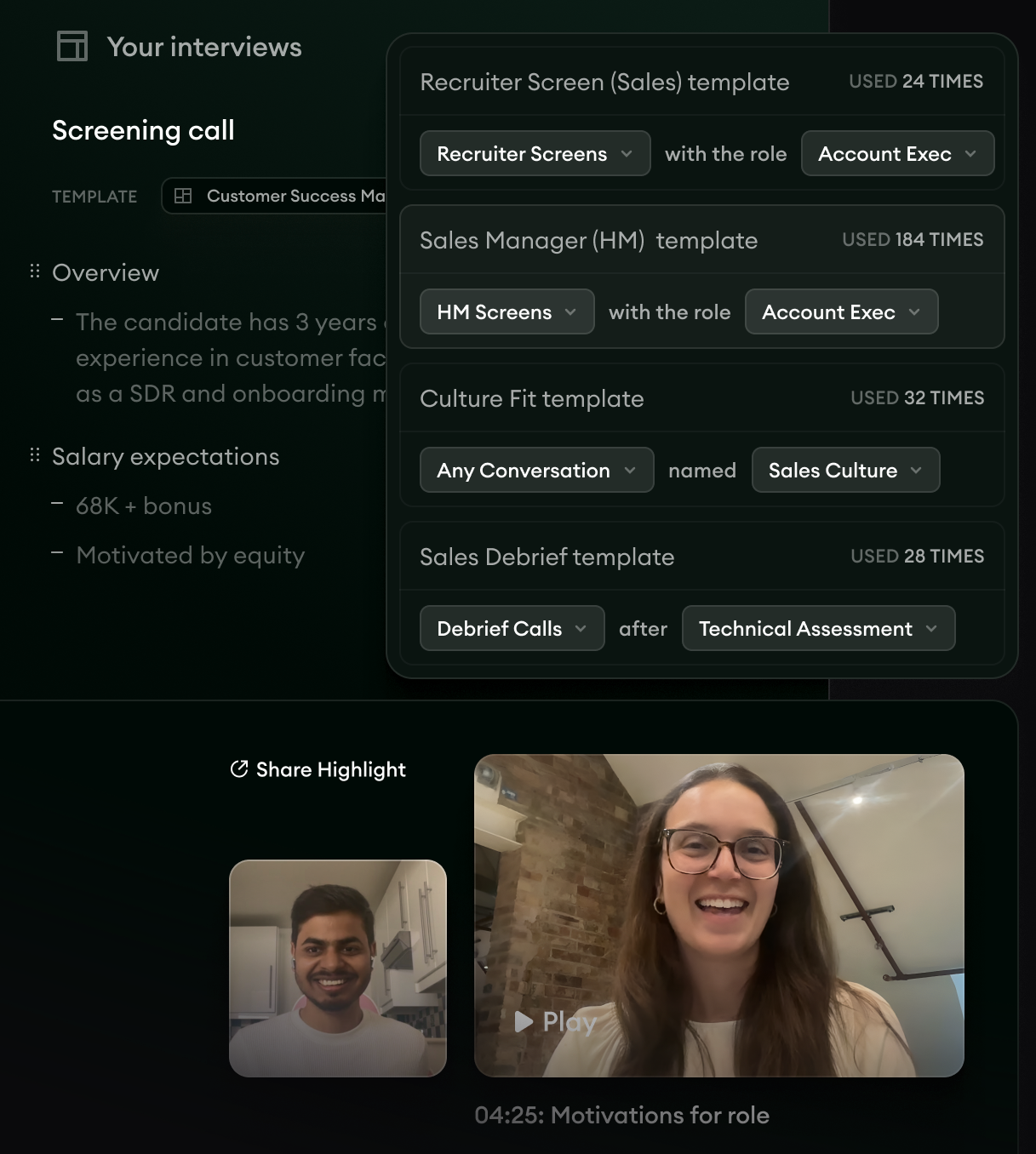
- 1Notes from a screening call under the template’s headings, here “Overview” and “Salary expectations.”
- 2Templates paired with the kind of call and the role, such as “Recruiter Screens” with the role “Account Exec.”
- 3A moment from the recording marked “04:25: Motivations for role,” the kind of timestamp a scorecard quote can point back to.
Metaview’s 35-second clip on customizing interview notes is about the setting behind those headings: which topics the notes cover and how they’re laid out.
Because Metaview captures every spoken word of the interview, the scorecard it drafts from the conversation starts from the candidate’s own answers. The interviewer checks the draft against those answers and makes the rating themselves before submitting it.
Interviewers on Ashby or Lever can submit the scorecard straight from Metaview. In Greenhouse they paste it in, and Metaview’s browser extension autofills the objective sections of Ashby and Greenhouse scorecards, leaving the subjective fields and the hiring recommendation to the interviewer.
Siadhal Magos, Metaview’s co-founder and chief executive, described the gap a record fills in a Metaview announcement from 2020:
Interviews are vital when building an exceptional team, and being an effective interviewer is a highly-valued skill. But there is so little data available to leaders about these crucial moments.”

A transcript is that data for one interview, as long as its words are right. So I’d keep the cleanup habit even when Metaview drafts the scorecard, and have the interviewer check the names and technical terms in each draft.
Once the interviews are captured, Reports lets your team query its own interview data and compare question coverage across interviewers and roles. I’d look there when the same competency keeps reaching the debrief with no quote behind it.
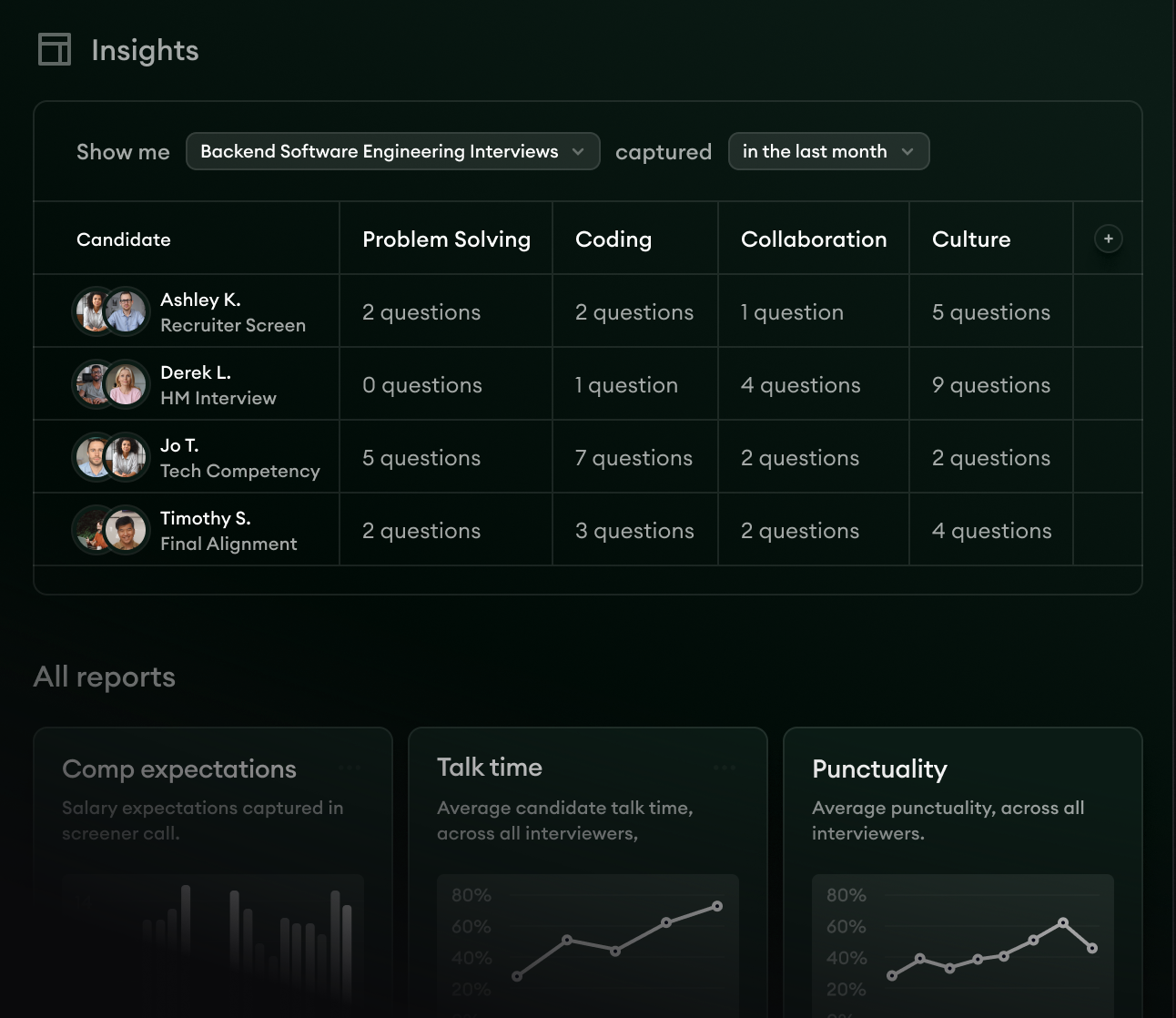
- 1The filter for one kind of interview and a time window, here “Backend Software Engineering Interviews” captured “in the last month.”
- 2One row per interview, with the questions asked under each competency, including a “0 questions” cell under “Problem Solving.”
- 3Reports listed under “All reports,” including “Talk time” and “Punctuality.”
Check the next week of Zoom interviews.
Give the setup a week of real interviews, then read the transcripts and scorecards for these signs. Each sign has its own first fix:
| The sign | What to fix first |
|---|---|
| Some interviews have no cloud transcript | Whether the transcript setting is locked on for every interviewer, and whether anyone recorded to their computer instead of the cloud |
| A scorecard quote sits under “Unknown Speaker” in the transcript | The cleanup pass, so speakers are named before anyone copies a line |
| Scorecards summarize the answers and quote none of them | The writing order, with one quoted sentence and its timestamp per competency before the rating |
| Scorecards arrive a day or more after the interview | The deadline, moved to the end of the interview day, and whether the transcript had arrived by then |
The third check is the one I’d run first, because when a scorecard quotes the candidate and gives the timestamp, the interviewer wrote it from the transcript. That habit is why I’d switch Zoom interview transcription on.
Start every Zoom interview scorecard from the transcript.
See how the Metaview Notetaker drafts a scorecard from a Zoom interview for the interviewer to check and submit.
Frequently asked.
Can Zoom transcribe an interview without recording it?
Yes. Automated captions transcribe the call as people speak, and where your settings allow it, the full caption transcript can be saved as a text file before the meeting ends. Tell candidates about that file the same way you’d tell them about a recording.
Do candidates need to agree before a Zoom interview is recorded and transcribed?
That depends on your company’s policy and the law where you and the candidate are, so ask whoever owns privacy to set the rule once. Whatever the rule, offer the candidate a way to go ahead without recording, with the interviewer taking notes by hand.
Is a Zoom transcript accurate enough to quote in a scorecard?
Zoom’s notes on its live captions say accuracy depends on things like background noise and how clearly people speak, and its advice for cleaner cloud transcripts points the same way: less noise and an external microphone. For a scorecard, quote only lines the interviewer has checked against the recording.
Should hiring managers read the full interview transcript?
I’d send them the scorecard first, with its quoted lines and timestamps. Keep the transcript for checking a line they doubt. A hiring manager who reads every transcript in a loop starts rescoring the interviews, and the interviewer who ran each one is better placed to rate it.
Does Metaview replace Zoom’s own transcription?
For the scorecard, yes. The Metaview Notetaker joins the Zoom call as a visible participant and records and transcribes the interview itself, so its transcript and notes are what the interviewer quotes. Keeping Zoom’s cloud recording as well is a storage decision, so make it once with whoever owns your data policy.


