
Of the best email finder tools for recruiters, choose the one whose lookup starts where your candidate list already sits: inside the tool that sends your outreach, at the candidate’s profile in your browser, or against a spreadsheet of names.
Every tool on this page returns an email address, and often a phone number, from something you already know about the candidate: a name and company, a profile, or a list. Each one publishes its pricing. The page sorts ten tools into three groups by where the lookup starts. For each tool, it covers what it charges for, what comes back, where the results go next, and the team it suits.
I recommend checking two places before you pay for any of them: your applicant tracking system (ATS), which may already have the address from an earlier application, and your sourcing tool, which may find it for you.
All ten tools at a glance.
The grid compares the ten tools on three things: where the lookup starts, what each tool charges for, and what comes back. The units in the grid are as published in November 2026.
| Tool | Where the lookup starts | What it charges for | What comes back |
|---|---|---|---|
| Metaview | Inside the tool that sends the sequence | Credits for new contact data: 3 for an email and 10 for a phone number, with sequences free to send | Verified emails and phone numbers |
| Juicebox | Inside the tool that sends the sequence | Contact credits: 1 to reveal an email and 3 to reveal a phone number | Personal and professional emails, and phone numbers |
| Apollo.io | Inside the tool that sends the sequence | Credits: 1 for a contact’s emails and 8 for a phone number | Personal and business emails, and phone numbers |
| ContactOut | At the profile, in a browser extension | Exports per month | Work emails, personal emails, and mobile numbers |
| Kaspr | At the profile, in a browser extension | Separate credits per license for phone numbers, personal emails, and exports | Business emails, personal emails, and phone numbers |
| SalesQL | At the profile, in a browser extension | One credit per contact with at least one email found | Personal and business emails, and phone numbers on paid plans |
| Wiza | At the profile, in a browser extension | One credit per valid email, and a phone allowance or price per number | Work emails, personal emails, direct dials, and cell numbers |
| Anymail Finder | Against a list, in bulk | Credits, charged only for emails it can verify | Verified work emails |
| RocketReach | Against a list, in bulk | Export credits, refunded when nothing is found and verified | Personal and professional emails, and phone numbers on higher tiers |
| SyncGTM | Against a list, in bulk | One credit per valid work email, and 3 credits per personal email lookup | Work emails and mobile numbers, with personal email as a separate lookup |
Prices sit in each entry below, with the billing period each tool publishes them on. Compare them as a cost per address you’ll send to, since the units differ from tool to tool.
Three places a lookup can start.
A recruiter usually reaches for an email finder at one of three points, and each group of tools starts the lookup at one of them:
- Inside a sending tool. The lookup runs on a candidate list that already sits in the tool you send sequences from, so the list stays in one place. Metaview, Juicebox, and Apollo.io are in this group. ContactOut, SalesQL, and RocketReach also send email campaigns, but their lookup starts at the profile or against a list.
- At the profile, in a browser extension. You open a candidate’s profile and reveal their details there, one candidate or one page of results at a time. ContactOut, Kaspr, SalesQL, and Wiza are in this group.
- Against a list, in bulk. You upload a list of names and companies, or profile links, and get addresses back for the whole list. Anymail Finder, RocketReach, and SyncGTM are in this group.
The entries run in that order, starting with the tools where the candidate list, the lookup, and the sending stay in one tool.
1. Metaview.
Metaview is the Agentic Recruiting Platform. Its Outreach finds contact details for candidates and sends automated email sequences to them from the same place. It leads this group because it covers the first check this page recommends: if a candidate’s details are already in your connected ATS, Metaview fetches them from there. The lookup and the sequence then follow in the same tool.
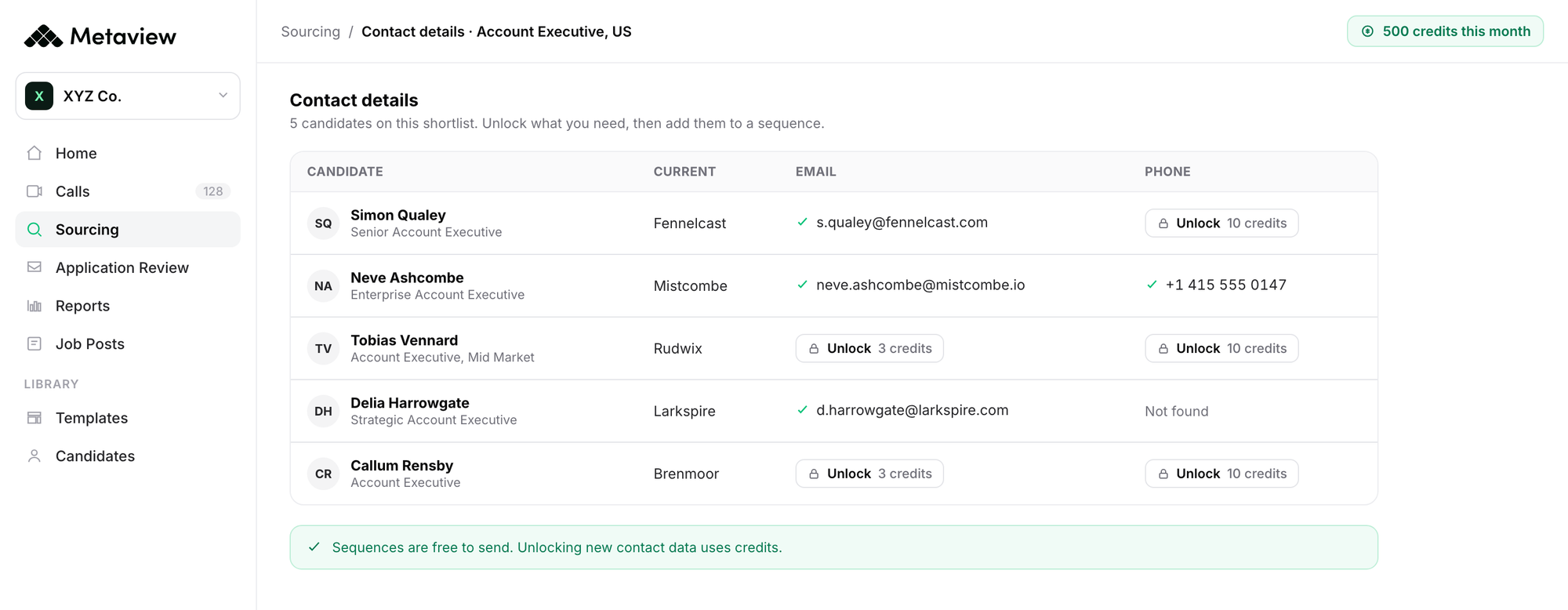
The lookup starts on a shortlist from its sourcing agent, which searches the web and your connected ATS from a plain-language description of the role and gives its reasoning for each candidate. That description can come from the intake call with the hiring manager: where consent has been given, the Metaview Notetaker records the call, and the recording captures every spoken word, so the sourcing agent searches from what the hiring manager asked for.
Outreach then finds verified emails and phone numbers for those candidates without you looking each one up by hand. The sourcing agent doesn’t contact anyone: the recruiter decides who gets a sequence.
Sequences are free to send, and new contact data uses credits: 3 for each new email found and 10 for each phone number. Every workspace gets 500 free credits a month, shared across the team. They reset each month and don’t roll over. Top-ups cost $10 for 100 credits and stay valid for six months.
In Outreach, those credits pay for verified emails and phone numbers. Verification is the part that saves work: a bounced email or a wrong number sends the recruiter back to check the list by hand. Shahriar Tajbakhsh, Metaview’s co-founder and chief technology officer, has described the cost of artificial intelligence (AI) output a recruiter can’t rely on:
If results aren’t reliable, AI doesn’t reduce work. It just moves it, and recruiters end up validating, correcting, and second-guessing the output.”

It suits a team that already sources candidates in Metaview. A team that builds candidate lists in another tool brings them in as a comma-separated values (CSV) file first.
2. Juicebox.
Juicebox is an AI candidate search and outreach tool for recruiters. The lookup starts inside it: you reveal a candidate’s details on their profile, and adding a profile to an email sequence reveals them too. It also has a Chrome extension.
Juicebox charges per reveal: revealing an email costs 1 contact credit and a phone number 3. The Starter plan costs $99 per seat a month, billed yearly, and includes 500 contact credits a month and 500 export credits. Growth costs $179 per seat a month, billed yearly.
It returns personal and professional emails, as well as phone numbers. The results go straight into its own email sequences.
Choose it if you search for candidates and write to them in the same tool.
3. Apollo.io.
Apollo.io is a sales platform with a contact database, browser extensions, and email sequences in the same plan. The lookup starts in its database or its extensions, and the contact can go into a sequence from there.
A contact’s emails cost 1 credit, whether you take the personal email, the business email, or both, and a phone number costs 8. Basic costs $49 per seat a month, billed annually, with 30,000 credits per seat a year. Professional costs $79 per seat a month, billed annually, with 48,000 credits per seat a year. Credits expire at the end of each billing cycle and don’t roll over.
It returns personal emails, business emails, and phone numbers. Basic includes two sequences, and Professional includes unlimited sequences.
It fits a team that already uses Apollo.io for sales and wants its recruiters on the same tool.
4. ContactOut.
ContactOut is a Chrome extension that finds a candidate’s details at their profile, on standard LinkedIn and on LinkedIn Recruiter Lite and Pro. It also has a search portal and an application programming interface (API) for working away from the extension.
Its plans are priced by exports per month: 300 a month on the email plan, at $49 a month, and 600 a month on the email and phone plan, at $99 a month, both billed annually. Each account also has a fair-use limit of 2,000 email credits and 1,000 phone credits a month.
It returns work emails, personal emails, and mobile numbers. You can add candidates to an email campaign from the same account.
It suits a recruiter who works candidate by candidate on LinkedIn and wants personal addresses.
5. Kaspr.
Kaspr is a LinkedIn Chrome extension that reveals phone numbers and emails from profiles, groups, and events. Its Business plan also works on top of LinkedIn Recruiter Lite.
Kaspr counts credits by type: each license gets separate credits for phone numbers, personal emails, and exports, and business emails are unlimited on paid plans under a fair-use policy. Starter costs $65 per user a month, billed monthly. Business costs $99 per user a month, billed monthly, and each license on it gets 200 phone credits and 200 personal email credits a month. Extra credits can be bought on top.
It returns business emails, personal emails, and phone numbers. It has an option to hide personal emails for compliance reasons.
It fits a team that wants a set number of personal email and phone reveals per recruiter each month.
6. SalesQL.
SalesQL is a Chrome extension that reveals contacts from profiles and search results on LinkedIn, Sales Navigator, and LinkedIn Recruiter. In Prospector, its lead search, you can select many contacts at once to reveal or export.
One credit covers one contact with at least one email found, and unmatched lookups are free. Phone numbers come with every reveal on paid plans. On monthly billing, Basic gives 2,000 credits a month for $39, Professional 5,000 a month for $79, and Premium 12,000 a month for $119.
It returns personal and business emails, and its API can return personal addresses only. It also sends its own email campaigns, and sending uses no credits.
Choose it if you reveal contacts in batches from LinkedIn search results.
7. Wiza.
Wiza is a Chrome extension that finds contact details while you browse LinkedIn. Importing a CSV file is part of its Team plan.
Wiza charges per valid email: each one uses one email credit. Starter costs $49 per user a month on monthly billing, with 100 valid emails and 100 phone numbers a month, then $0.15 for each extra email and $0.35 for each extra phone number. The annual Email plan costs $83 per user a month, billed at $990 a year, with unlimited email reveals and $0.35 per phone number.
It returns work emails, personal emails, direct dials, and cell numbers. Results go out as exports or to a customer relationship management (CRM) system.
It suits a recruiter who wants email reveals priced per valid email or unlimited on the annual plan, with phone numbers bought as needed.
8. Anymail Finder.
Anymail Finder finds and verifies work emails from a name and company, a company domain, or a LinkedIn profile link. You can upload a CSV or Excel file of up to 100,000 rows, or look up one person at a time. It also has a browser extension.
It charges only for verified emails. Monthly plans run from $29 for 400 credits, at $0.073 a credit, to $799 for 100,000 credits, at $0.008 a credit.
It returns verified work emails, and each one is checked at the time of the lookup.
Choose it for a list of names and companies, such as event attendees or referrals, when you want work addresses checked before sending.
9. RocketReach.
RocketReach is a contact database searched in its web app, with list building, CSV enrichment, a Chrome extension, and an API. It also sends email sequences, up to 500 emails a day.
Export credits pay for bulk and API lookups, CSV downloads, list uploads, and CRM exports. A lookup is refunded when no email or phone number is found and verified. The email-only Essentials plan costs $33 a month, billed annually at $399, for 1,200 exports a year. Phone numbers come on the Pro and Ultimate tiers.
It returns personal and professional emails, and you can set it to return only one type. It connects to the Bullhorn ATS as well as to Salesforce and HubSpot.
It suits a team that enriches whole lists and wants to choose between personal and work addresses.
10. SyncGTM.
SyncGTM is an AI platform for business-to-business revenue teams. It runs waterfall enrichment: it tries several data providers in turn on each record you import, until one returns a result. It then pushes the records to a CRM or to sequencing tools such as Instantly and Smartlead.
A valid work email costs 1 credit, and an invalid result costs nothing. A personal email is a separate lookup at 3 credits. Solo costs $49 a month, billed monthly, with 1,000 credits a month, and unused credits roll over.
It returns work emails and mobile numbers, with personal email as its own lookup.
It fits a team that already runs outreach in a sequencing tool and wants several data providers tried on each record.
How to choose between the best email finder tools.
Start from where your candidate list sits today and how you’ll send to it:
- Your shortlist already sits in a tool that sends sequences. Use the lookup built into it, such as Metaview, Juicebox, or Apollo.io, so the list stays in one place from search to send.
- You work candidate by candidate on LinkedIn profiles. Use an extension, such as ContactOut, Kaspr, SalesQL, or Wiza, and compare what each one charges for: an export, a reveal from a set pool, a contact with an email, or a valid email.
- You have a spreadsheet of names from an event, a referral drive, or an old search. Use a bulk tool: Anymail Finder for verified work emails, RocketReach to choose between personal and work addresses, or SyncGTM to try several providers on each record.
- You email passive candidates and need rules on personal addresses. Choose a tool that lets you control which type comes back, such as RocketReach’s email type setting, SalesQL’s personal-only API option, or Kaspr’s option to hide personal emails.
Whichever tool you pick, an address only helps if the message gives the candidate a reason to reply. There’s a guide to personalizing recruiting outreach emails once the address is in hand.
Finding more addresses can tempt a team to write to everyone it can reach. In this episode of the 10x Recruiting podcast, host Nolan Church talks with guest Chandler Martin about disciplined outbound, and why sending to every candidate you can reach burns through a talent pool over time.
Choose the email finder that starts its lookup where your list already sits, and spend its credits on the candidates you’d write to anyway. That keeps the cost per address low and the outreach focused.
Find the email and send the sequence in one place.
See how Metaview Outreach finds verified contact details for a shortlist and sends automated email sequences to it, with the recruiter deciding who gets one.
Frequently asked.
What is an email finder tool?
An email finder tool returns a person’s email address, and often a phone number, from something you already know about them, such as their name and company, a profile link, or a row in a list. Most also check whether the address is valid before you send to it.
Can recruiters email a candidate’s personal address?
It depends on where the candidate lives and on your company’s rules. Under the General Data Protection Regulation (GDPR) in Europe, you need a lawful basis to use a candidate’s personal data, and you usually have to tell them where their details came from. Agree on the rules with whoever owns data privacy before the team sends.
How do you compare what email finder tools cost?
Work out the cost per address you’ll send to. Take the plan price, divide it by the addresses the plan gives you in a month, allow for lookups that come back empty or bounce on tools that still charge for them, and check whether unused credits roll over or expire. Count phone numbers separately, since several of these tools charge more for a phone number than for an email.
Should a recruiter use a personal or a work email?
A passive candidate may not want a message about another job in their work inbox, so a personal address is often the better choice when the rules allow it. A work address is sometimes the only one you can find, so keep that first message short and discreet. Settle which your team uses before buying, since it changes which tool fits.
What’s the difference between an email finder and a sourcing tool?
A sourcing tool finds the people who fit a role. An email finder finds the address for a person you’ve already found. Some tools do both. There’s a separate guide to candidate sourcing tools for the step before the lookup.


