
Somebody’s going to find the problems in your new artificial intelligence (AI) screening call. Better it’s your own team during a pilot than your first batch of applicants.
A read-through of the question list won’t find most of them. 76% of the questions the Metaview Screening agent asks are follow-ups to what the candidate says, and even the planned questions are tailored to each candidate’s resume.
So the way to test AI screening before launch is to judge what comes out of real conversations. Run pilot calls, have your recruiters score the same calls blind, on the same rubric, and compare their ratings with the agent’s.
Spend an afternoon on the preview and most of the pilot on that comparison. And write down what counts as a pass before the first test call, because a bar set after the results arrive tends to land just below them.
This guide walks through a pilot in the order you’d run it, from choosing the role and the pass bar to the blind comparison and the legal check.
By the end of it, you’ll know what a pilot can and can’t tell you, how to test the calls candidates will take, and how to make the final call.
What testing AI screening before launch can prove.
A pilot answers one question well: does the screen rate people the same way your recruiters would? That’s agreement with your recruiters, and you can measure it before a single applicant is invited.
It can’t tell you whether a “Great fit” goes on to be a great hire. Nothing in a pilot follows anyone into the job, so a claim that the pilot showed who will succeed in the role goes beyond what it measured.
Agreement has a ceiling, too. If two of your recruiters rate the same call differently, the agent can match one of them at most, so measure how often your recruiters agree among themselves first.
High agreement can also mean the agent shares your team’s blind spots. If your recruiters tend to mark candidates down for an accent they find hard to follow, an agent that matches them will look accurate and make the same mistake.
So agreement can’t be your only test. Run a paired fairness check beside it: test candidates who give the same answers and differ only in a detail the rubric should ignore. The legal section below shows how.
Pick one role and write the launch criteria first.
Screening has the strongest impact in high-volume roles where 50+ candidates apply per opening, and a resume can’t show who can do the job. Many support, sales development, front-of-house operations, and healthcare roles fit that description.
So start with a single role that hires often and already gets a recruiter phone screen, so your team knows what a good answer sounds like.
Leave executive searches and bespoke technical assessments out of the pilot. They’re the wrong test of Screening, and they tell you little about the roles it was built for.
The Society for Human Resource Management’s July 2026 reporting on employers adopting these tools landed in the same place: a narrowly defined first use case, clear evaluation criteria, and legal involved from the start. (The legal implications are important. More on them below.)
Then write the launch criteria. Keep them to one page, date them, and give them a named owner. Split them into two gates, starting with the internal pilot, where colleagues take the screen:
- Agreement: how often the agent’s rating has to match your raters’ consensus on the same call. Set against how often your raters agree among themselves, since the agent can’t beat that.
- Match rules: whether a match means the same band or one band apart, and how you settle a split.
- Hard misses: how many opposite-end misses you’ll accept. A “Poor fit” for someone your raters scored at the top is one I’d treat as a stop. (Keep reading for clear definitions of go, fix, and stop.)
- The script: every persona and condition run, and every failure logged with its cause.
- Sign off: the hiring manager and legal agreed on the criteria before the pilot starts.
The second gate is a small first cohort of real applicants, with a recruiter reviewing every call:
- Completion: the rate you expect, and whether you count it from invitations or from calls started, since that choice changes the number.
- Candidate feedback: what those candidates say about the call.
- Agreement that holds up on real answers, measured the same way as in the pilot.
Signing the criteria before the pilot stops anyone moving the line once results come in.
Four published figures about Screening are worth knowing before you set yours.
Treat them as context for your own numbers. Survey your first cohort on the call, note which follow-ups land in your script, run each language you plan to offer, and check your role’s volume against that threshold.
Build the screen from a call you already trust.
Point Screening at the role and it generates a first version: questions and a scoring rubric for each one, built from a job post or from an existing screening call.
If your recruiters already run phone screens for this role through Metaview’s Notetaker, which captures every spoken word, their calls are on record. Build from the version they trust most, the one that asks every candidate the same core questions.
Then read every rubric band as if you had to defend it to a rejected candidate. A band that says “strong communicator” gives the agent a label and nothing observable to look for.
A band that describes the evidence gives it something to find, such as a specific example with what the candidate did and how it ended.
If your team has never agreed what a good answer to each question sounds like, the screen will score every call against the same unclear standard.
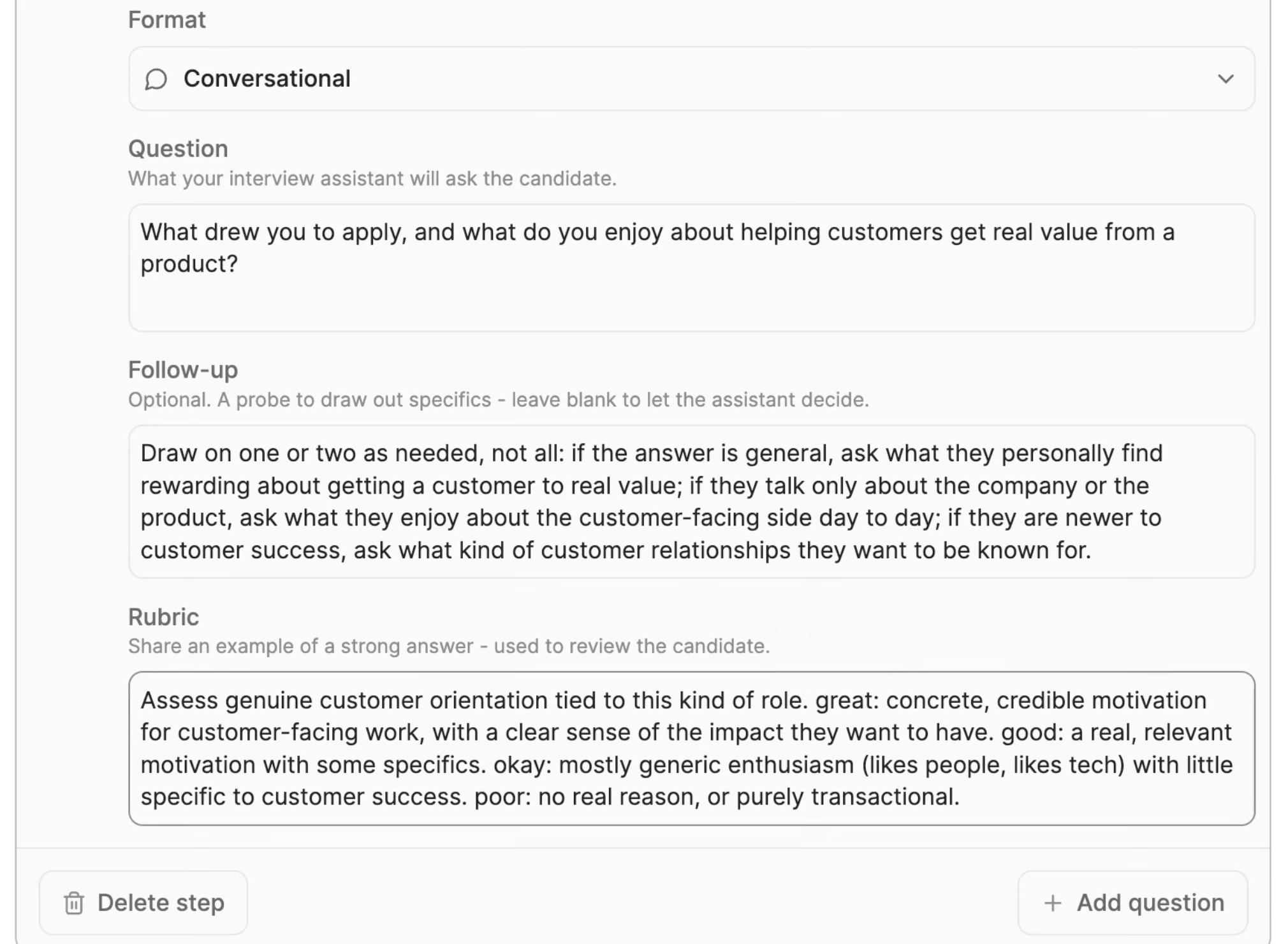
- 1“Format” sets how the question is asked, here as a conversation.
- 2“Follow-up” holds an optional probe. Left blank, the agent decides how to follow up.
- 3“Rubric” spells out what a great, good, okay, and poor answer looks like for this question.
Questions with a blank follow up deserve the hardest testing, because the agent chooses its own probe there. Some criteria don’t belong in the call at all; our guide on what to screen for walks through which stage should own each one.
Run one quick check before the first test call: Have two recruiters score two or three of your recorded phone screens against the new rubric, and rewrite any band where they land apart.
Load the context too. The agent reads the job criteria, your Ideal Candidate Profile, workspace knowledge about how you hire, plus each candidate’s resume, and tailors the questions from them.
Candidates can also ask it questions back. So if pay, shifts, or location aren’t in that context, test what it says when someone asks.
Run a fixed test script before any real applicant takes the call.
Start in the preview, which runs single questions or the whole call end to end before anything goes to candidates. (Our guide to where the screening call sits puts that preview in the setup order.)
Metaview’s launch film shows the call from the candidate’s side: the agent adapts to what people say, digs deeper when an answer is unclear, and takes their questions.
A single friendly run-through only covers the easy case. Share the screening link individually with three or four colleagues, so every test call runs the way a candidate’s would and comes back scored.
Write one fixed script and give each colleague two or three of its personas, so every persona gets played more than once. Keep whoever wrote the script off the rating panel.
Have testers answer in their own words, since reading a script aloud can trip the same integrity checks a real candidate would.
The personas to script:
- The strong candidate, whose answers carry exactly the evidence your top rubric band describes. The rating should come back at the top, citing that evidence.
- The one-line answerer: “Yes, I’ve handled complaints.” Pass it only if the agent asks for an example and the rating reflects how little it got.
- The half answer, a situation with no action and no outcome. Pass it only if the follow-up goes after the missing half.
- The borderline candidate, whose answers sit between two bands. The middle of the rubric is where agreement is hardest to earn, so run more than one.
- The wanderer, who drifts off topic mid-answer. Check that the call gets back on track without the agent cutting them off.
- The candidate who fails a knockout, such as a license or language the role requires. When an HR for Humans editor tested another company’s AI screening in June 2026 as an unqualified candidate, she had to tell it twice that she didn’t speak Burmese.
- The candidate whose resume doesn’t fit the questions, such as a graduate with no work history. One candidate on Reddit described another company’s agent that kept asking about past salary after being told they had never worked.
- The candidate who volunteers something the law protects, such as a health condition or childcare. Check that the agent doesn’t follow up on it, and that the rating ignores it.
- The candidate reading a polished answer off a second screen. If you require video, the agent watches for that, and either way the scorecard’s “Authenticity” section shows what it flagged.
Test the conditions of a real call.
Start with what candidates are promised. The panel they see before the call makes three promises, and each one is a test.
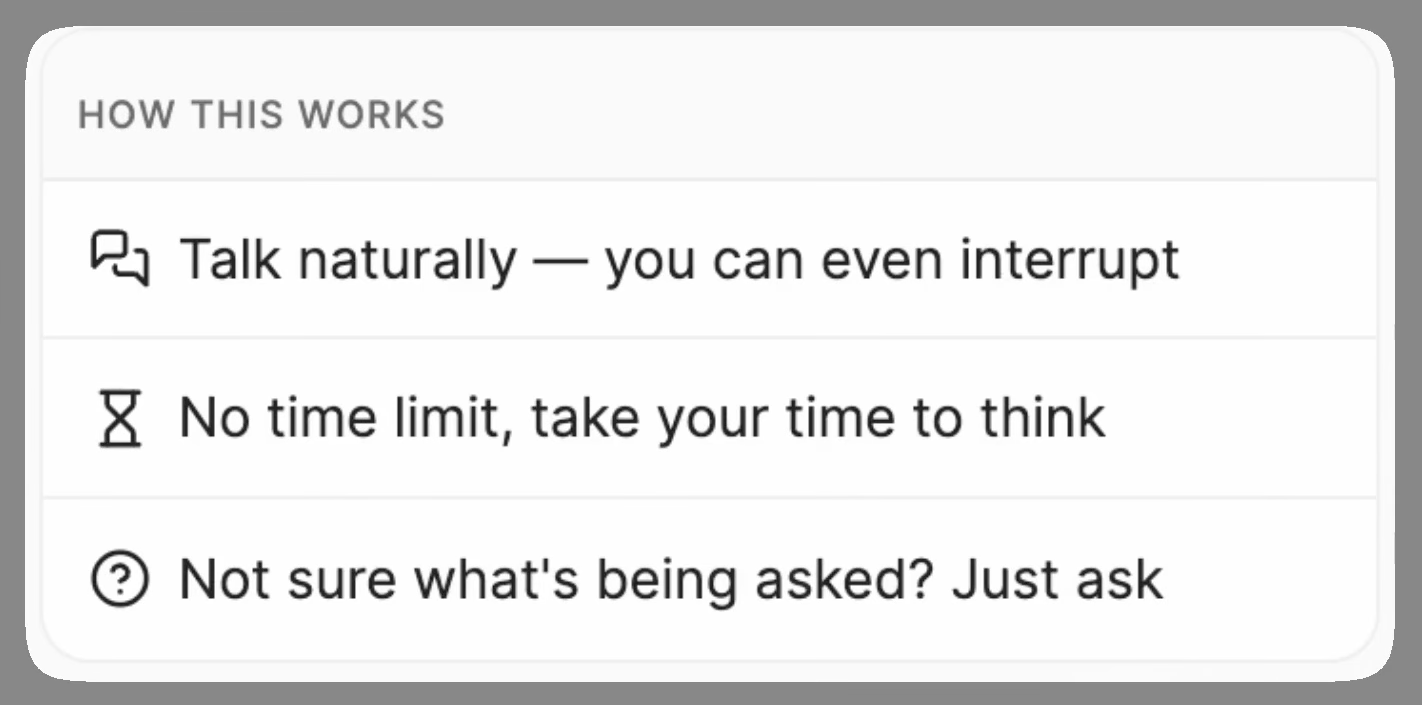
- 1Candidates can talk naturally and interrupt.
- 2“No time limit, take your time to think.”
- 3Candidates can ask when a question is unclear.
Put every tester through these conditions at least once, starting with those three promises:
- Interruptions. Cut in halfway through a question and see how the agent handles it.
- Pauses. Stop mid-answer, take a breath, and restart a sentence. A candidate told CNBC in September 2026 that a voice screen he took with another employer kept repeating the same question and cut in when he took a breath, so he hung up early.
- Questions back. Ask the agent to repeat or explain a question, then ask about pay or shifts.
- Your role’s own words. Listen to how the agent says your product names, sites, and job titles. In a 2025 video reported by NBC News, an avatar on another company’s platform got stuck repeating the name of a fitness class, then ended the call.
- The line itself. Take the call on a phone at a noisy bus stop, and in each language you plan to offer, with a fluent tester. Screening supports 18 languages, and each one you offer needs its own run.
- A broken call. Close the tab halfway through and decide what that candidate hears from you next. The candidate in that 2025 video says she never heard back.
Treat this as a starting set, and add the answers your own role attracts and the adjustments your candidates are likely to ask for.
Log every failure in one sheet: who tested, which question, what happened, and what should have happened. Note the likely cause before you fix anything, because each cause needs a different fix.
Check the question, the rubric band, the context the agent had, the audio and transcript, and whether the tester misread the question.
If the agent itself misbehaves, such as cutting in on a pause or mispronouncing a word, log it as agent behavior, rerun it, and raise it with Metaview. If it keeps happening, count it toward stop.
Have your recruiters rate the same calls, blind.
Take every scored pilot call and ask two or three recruiters and the hiring manager to score each one on the same rubric, blind to the agent’s rating. This comparison carries the most weight in your launch criteria.
Give them the same material to judge. Each call comes back with a recording and a transcript mapped question by question, since Screening shares its technology with Metaview’s Notetaker.
Add the resume the agent read and the role’s criteria, and keep the agent’s rating out of sight until everyone has scored.
Run enough calls that every band on the rubric shows up more than once, including the borderline ones. Then compare the raters’ scores against one another, before anyone looks at the agent.
Where they split, find out why. It might be a band that reads two ways, a borderline answer, a rater who missed something, or a rater using knowledge the rubric doesn’t mention.
Next, compare the agent’s rating with their consensus. Count exact matches, misses one band apart, and opposite-end misses separately.
A call the agent rates “Great fit” that your raters scored at the bottom, or the reverse, is the miss your criteria should cap.
Only then show raters the agent’s ratings. For each miss, read the reason the agent gave, then open the scorecard for the evidence behind each question’s rating.
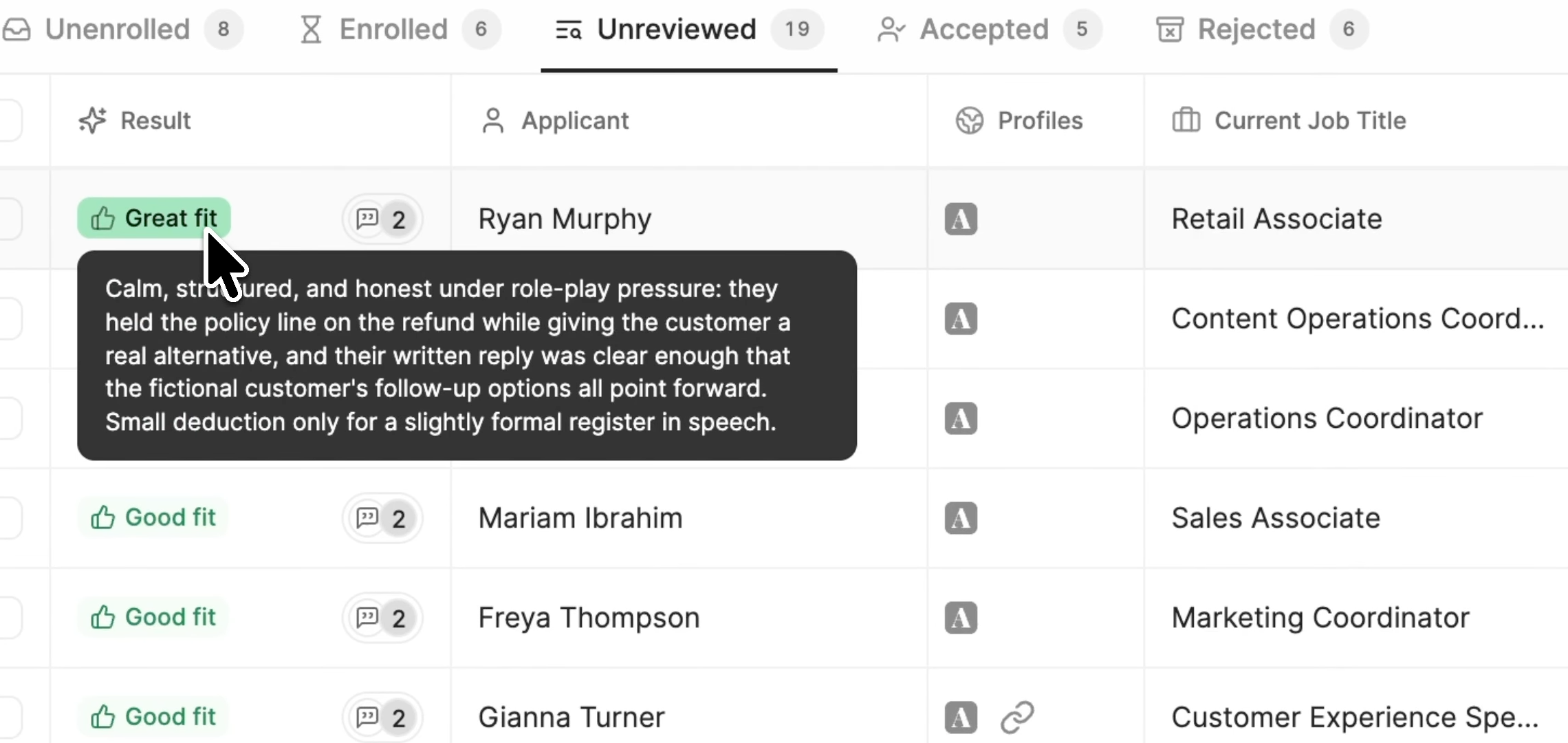
- 1The agent’s overall rating for a completed call.
- 2The reason behind that rating, including the small deduction the agent made.
- 3Tabs that split candidates by status, from “Unenrolled” to “Rejected”.
After the blind scores are in, have raters write a reason wherever they disagree with the agent. Screening learns from the decisions recruiters make and the feedback they write, then suggests rubric changes that a recruiter accepts or dismisses.
Hold any rubric changes until the pilot read-out, so you aren’t changing the rubric while you measure it. After launch, those suggestions are built from what recruiters approve, reject, and write, so the habit is worth starting now.
How Workleap’s recruiters learned to trust an agent’s ratings.
Reading the reasoning behind each rating is also how a team learns to trust an agent.
Workleap’s recruiters had to decide whether to trust a different Metaview agent, Application Review, which checks every application against the role’s criteria. The case study credits the reasoning behind each recommendation, which recruiters could check rather than accept blindly.
For Johnny Drexhage, a senior recruiter there, that took days: “Within a few days, my trust factor for this tool went up quite highly.”
Workleap’s recruiters were routinely reviewing 200 to 300 candidates per role. With Application Review, Johnny says it “reduced my screening time by up to 50%,” and the full Workleap case study is worth reading if your team is wary.
Shahriar Tajbakhsh, Metaview’s co-founder and chief technology officer, has written about what unreliable output costs the people downstream of it, which is the work a pilot saves you after launch.
If results aren’t reliable, AI doesn’t reduce work. It just moves it, and recruiters end up validating, correcting, and second-guessing the output.”

What a candidate sees around the call.
A candidate NBC News interviewed in 2025 wasn’t told her screen was run by AI, had no way to opt out, and never heard back afterward. Each of those sits in settings and templates you control.
Much of what a candidate experiences is yours to configure, and a pilot is the cheapest time to read it as a stranger would.
For the candidate-side numbers, what completion rate leaves out are the accompanying points of contact. Check these in the order a candidate meets them:
- The invitation email. You can customize it, so read what the default says before you send anything. It should say plainly that the call is with an AI agent, what it covers, and what happens next.
- The welcome screen and video. Candidates see a time estimate before they start, and the length depends on the plan you built, so time the whole call in preview and make sure the estimate holds.
- The voice and the video setting. You pick the agent’s voice and whether candidate video is on, optional, or off. Requiring video adds checks for reading from a second screen or a script and for chatbot use, but it asks more of every candidate.
- The way out. Decide what a candidate gets if they’d rather not talk to an agent, offer it, and check that it leads somewhere real, such as a call with a recruiter.
- The deadline and the rejection email. A recruiter makes the call on everyone who completes the screen. For those who never finish, check whether any setting acts on them automatically and who reviews them, then read the rejection email as the person receiving it.
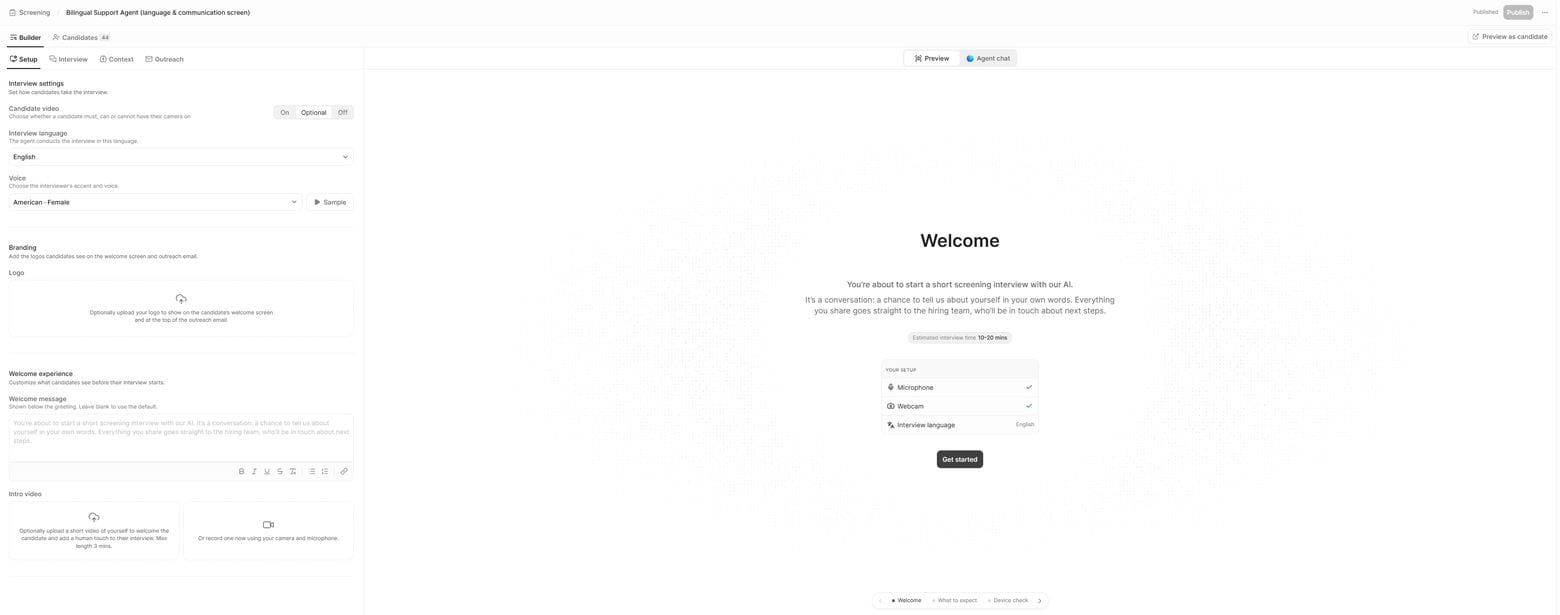
- 1“Preview” shows the welcome screen before any candidate does.
- 2“Sample” plays the selected “Voice” before you commit to it.
- 3The time estimate your preview timing should match.
In the first cohort, ask candidates to rate the call. Metaview’s internal surveys currently put average candidate satisfaction at 4.7 out of 5, and your own cohort’s number is the one to act on.
Put the rules and the ratings in front of legal.
In 2023 the Equal Employment Opportunity Commission settled a case against a tutoring company whose application software, it alleged, was set up to reject older applicants automatically.
The agency said it came to light when an applicant reapplied with the same details and a more recent date of birth, and got an interview.
Screening adheres to the European Union’s AI Act, New York City’s Local Law 144, and guidelines for bias and adverse-impact testing.
Your obligations as the employer, such as what you tell candidates and when, still sit with your team and depend on where you hire.
A few examples of what legal will look at:
- New York City’s law requires employers to have a bias audit done, publish a summary, and give candidates advance notice before using an automated employment decision tool. Whether your setup counts is a question for legal.
- Illinois has a separate law for AI that analyzes video interviews, which comes into play if you require video.
- California’s rules on automated-decision systems, in force since October 2025, treat evidence of anti-bias testing, or its absence, as relevant to a discrimination claim. Keep the records of your paired fairness checks, covered below.
Bring legal in early, when you write the launch criteria, and give them everything that can reach a candidate or act on one:
- The question list and the rubric, including every knockout question.
- A sample of pilot transcripts, since the question list only shows where each call starts. The follow-ups and the agent’s answers are in the transcripts.
- The invitation email and the rejection email.
- The opt-out route, and any deadline or automatic rule.
- How long you keep recordings.
Then list every rule in your process that can act on a candidate without a person pressing a button, and put each one in front of legal before the first real applicant.
Before launch, have legal confirm that no question probes age, disability, religion, or any other protected category, including in the follow-ups. Every knockout also has to be lawful in each place you hire.
Run the questions through the candidate screening bias checks as well. When you describe the screen to candidates, say what it does: the same starting questions and rubric for everyone, follow-ups that depend on their answers, and a person making the decision.
Run a paired fairness check.
The 2023 case points to a simple fairness check you can run during the pilot. Rerun one unchanged persona first to see how much ratings move on their own.
Then run a few pairs that differ only in a detail the rubric must ignore, such as a name, and treat any gap beyond that normal variation as a flag to review.
Two colleagues with different accents giving the same answers test the voice side, and the transcript shows whether a gap came from what was heard or from how it was scored.
Keep a record of every pair you run, and hand it to legal with everything else.
Call it go, fix, or stop.
When the pilot ends, read it against the launch criteria in one sitting, with the people who signed them. Your pilot’s candidates list puts each call’s overall result next to the rating for each question, which makes misses easy to trace.
Go means sending this role’s screen to a small first cohort of real applicants, with a recruiter reviewing every call, and widening it once that cohort clears its gate. The next role gets its own script and its own pilot.
Fix means changing the question, the band, or the context behind each logged failure or miss, then rerunning whole calls through the script and scoring them blind again.
If the role needs a hands-on practical test, or it’s an executive search, stop is the right result. Keep that stage human and write down why.
Send it to everyone when both gates clear the criteria you signed and legal has signed off. By then you’ll know the agent rates candidates the way your recruiters would on the calls you tested, which is the claim a pilot exists to test.
See how Screening builds, previews, and scores a call.
A walkthrough of the builder, the end-to-end preview, and the scorecard your recruiters would compare against.
Frequently asked.
How do you test an AI screening tool before using it with candidates?
Have a few colleagues take the real screen with a fixed script of strong, thin, borderline, and off-script answers, and log what breaks. Recruiters and the hiring manager then score those calls blind before anyone compares them with the agent. Agree what counts as a pass before the first call.
Should candidates be told they’re talking to an AI?
Yes. Say so in the invitation email and again on the welcome screen, before the call starts. In New York City, for example, employers must give candidates advance notice before using an automated employment decision tool.
What happens if a candidate doesn’t finish an AI screening call?
It depends on how you set it up, which is why it belongs in your launch criteria. Check whether any deadline setting acts on unfinished calls automatically, decide who reviews those candidates, and decide what they hear from you.
Can candidates opt out of an AI screening call?
They can if you give them the option, and you should. Decide what someone who opts out gets instead, such as a call with a recruiter, and make that route as quick to use as the screen itself.
Does AI screening decide who moves forward?
Each completed Screening call comes back with a fit rating and the reasoning behind it, and a recruiter chooses who advances. Metaview does not make that decision, and candidates who never finish are a separate question for your own process.


